GenBlink
GenBlink help center

Questions,
clearly answered.

Short, direct answers about photo packs, free tools, credits, privacy, downloads, and the images that work best.

01

Getting started

What is a GenBlink photo pack?

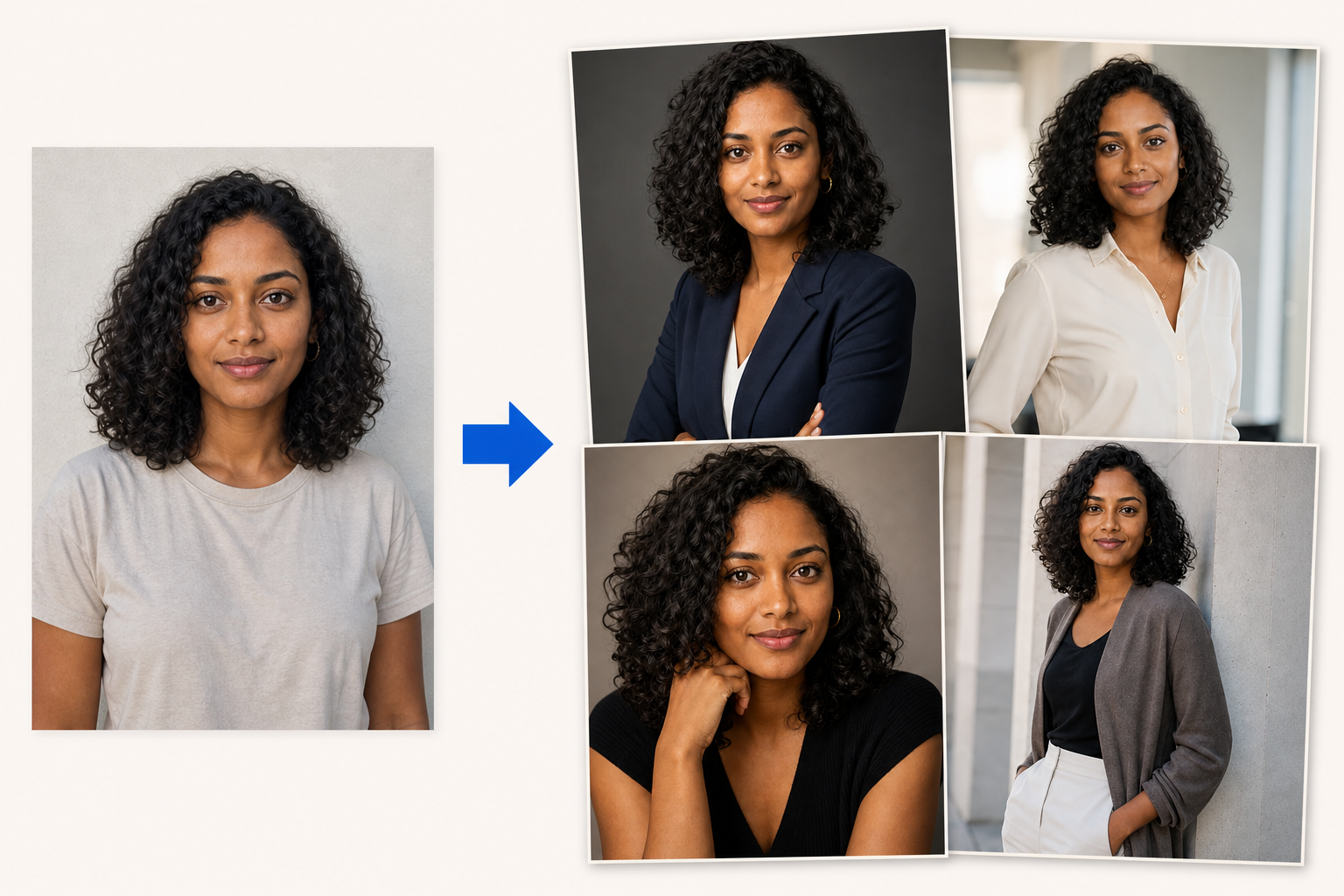
A photo pack is a curated set of scenes, poses, styling, and lighting directions. You choose a pack, upload one clear adult portrait, and generate 10–50 personalized photos.

What source photo works best?

Use a recent, front-facing portrait with one adult face, even natural light, sharp focus, and no sunglasses or face covering. Avoid group photos and heavy beauty filters.

Do I have to write prompts?

No. The selected pack supplies the full scene direction. An optional advanced note lets you add a specific appearance detail such as an outfit, accessory, hairstyle, or expression.

Can every generated image look exactly like me?

No image model can guarantee perfect likeness in every result. A strong source portrait helps, but review each output before using it publicly or professionally.
02

Free image tools

How many free tool uses do I get?

You can complete three successful free-tool operations per UTC day across the entire tools collection. The allowance resets automatically the next day.

How is the daily free limit enforced?

GenBlink checks both a one-way hash of the network IP address and a random browser identifier stored in localStorage. The raw IP and browser token are not stored in the usage ledger.

Does a failed tool operation use a free credit?

No. A use is reserved while the image is processed, then counted only after a valid result is produced. Invalid files and processing failures release the reservation.

Are free-tool credits the same as photo-pack credits?

No. The three-use daily tool allowance is separate from purchased photo-pack credits. Using a resizer or converter never removes paid pack credits.

Are uploaded free-tool images saved?

Transformation tools process images in memory. Background removal and upscaling run local neural models on GenBlink's server. Free-tool uploads and results are not added to your GenBlink gallery or retained there as user files.

03

Credits and billing

How do photo-pack credits work?

One successful generated pack photo uses one purchased credit. Credits are one-time purchases and stay in your account until you use them.

What happens if a generated photo fails?

Failed generations return their reserved credit automatically. You pay only for successful pack results.

Does GenBlink sell subscriptions or lifetime plans?

The photo-pack experience uses one-time credit packages. There is no photo-pack subscription or lifetime package.

How are payments handled?

Checkout is securely hosted by Stripe. GenBlink does not receive or store your full payment-card number.

04

Privacy and results

How long are generated pack results available?

Generated pack results remain in your private history for seven days. Download the files you want to keep before they expire.

Can I download all my results together?

Yes. You can download individual results as PNG, JPEG, or JPG, or download all successful results from a job as a ZIP archive.

What happens to the original portrait?

The source image is normalized and its metadata is removed before generation. Its private job folder is deleted after the batch finishes.

Can I upload another person's portrait?

Only when the image shows a consenting adult and you own the photo or have permission to use it. The upload form requires both confirmations.

05

Files and formats

Which source formats do photo packs accept?

The pack generator accepts JPEG, PNG, and WEBP files up to 12 MB.

Which formats do the free tools accept?

Most tools accept JPEG, PNG, and WEBP. The converter also accepts HEIC and HEIF when supported, and the dedicated HEIC tools make the target format clear.

Does GenBlink remove EXIF metadata?

Pack source photos and free-tool outputs are re-encoded, so source EXIF metadata is not copied into the generated or transformed result.

One photo in · a complete gallery out

Upload one clear photo. Create 10–50 new photos of you.

GenBlink keeps the same recognizable person at the center while changing the setting, outfit, pose, framing, and light across a coordinated photo pack.

1 source photo 10–50 AI photos
Choose a photo pack
One source portrait shown transforming through an arrow into four coordinated AI-generated portraits
Source photo Four examples from a larger pack
Keep creating

Want unlimited AI photos of yourself?

Photo packs are not restricted by the free-tools daily limit. Generate as many successful photos as your purchased credit balance allows—without a subscription.

Browse photo packs
One-time credit packs

Add credits. Keep them until you use them.

One successful generated photo uses one credit. Failed generations return their credit automatically.

Starter

10 credits

$7.99 0.80 per photo
Popular

20 credits

$11.99 0.60 per photo
Better value

30 credits

$14.99 0.50 per photo
Everyday

50 credits

$24.99 0.50 per photo
Creator

100 credits

$44.99 0.45 per photo
Studio value

250 credits

$109.99 0.44 per photo
Biggest pack

500 credits

$214.99 0.43 per photo

One-time credits only. No subscription. Secure checkout by Stripe.

Your photo is ready

Save it to your private account

Log in or create an account to continue. Your selected photo stays privately in this browser and returns with you.

Log in Create account
Generated photo preview
Private result

Download your photo

Choose the file format you need.