GenBlink
Independent decision guide · Updated July 2026

Choose the right way to create AI photos of yourself.

There is no universal “best” AI photo tool. There is a best fit for your goal, patience, desired control, and tolerance for setup.

Our take

GenBlink is built for guided variety: one portrait, a curated pack, and 10–50 results. The alternatives below may be a better fit when you need professional headshots only, conversational editing, artistic control, a complete design suite, or your own infrastructure.

One photo in · a complete gallery out

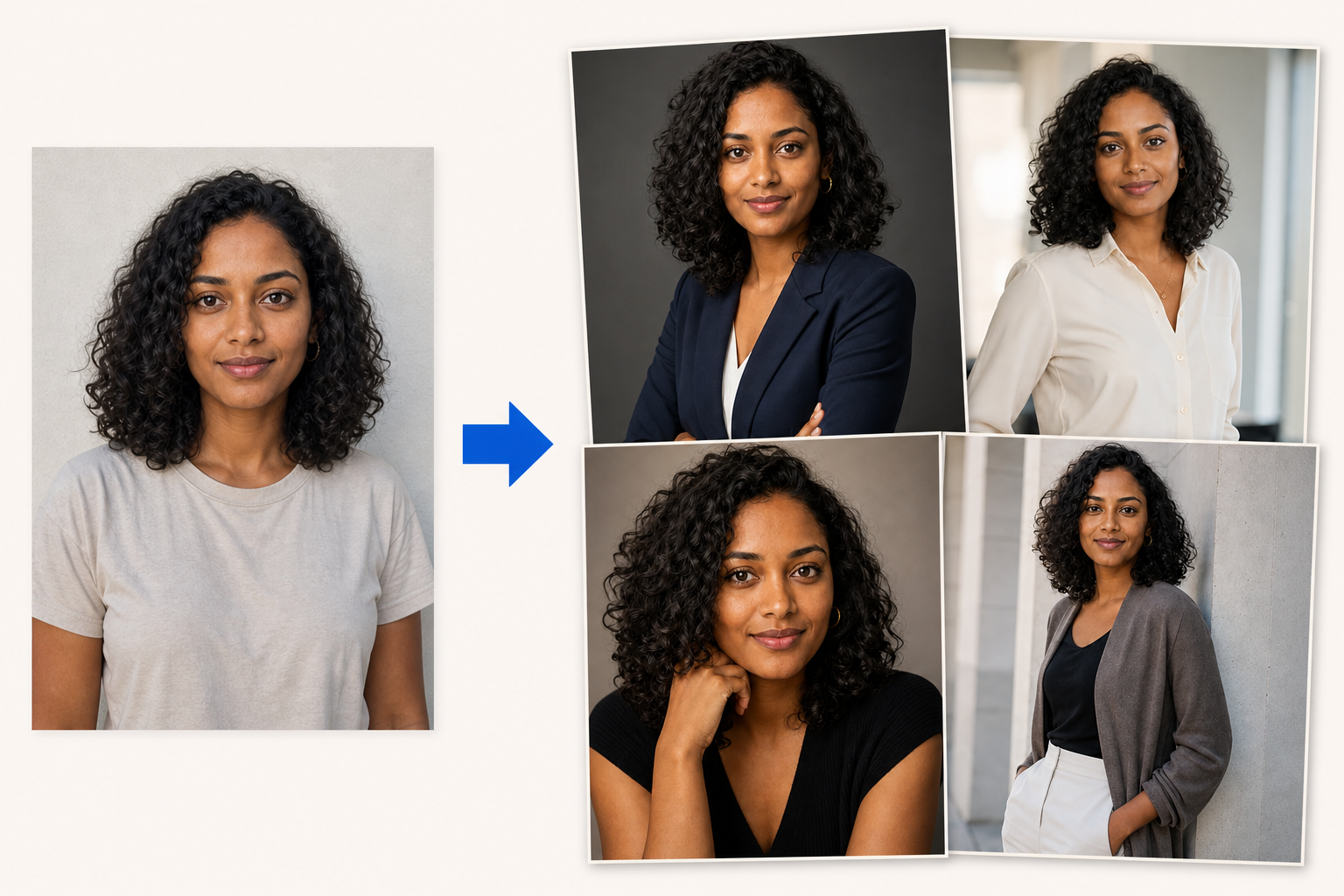
Upload one clear photo. Create 10–50 new photos of you.

GenBlink keeps the same recognizable person at the center while changing the setting, outfit, pose, framing, and light across a coordinated photo pack.

1 source photo 10–50 AI photos
Choose a photo pack
One source portrait shown transforming through an arrow into four coordinated AI-generated portraits
Source photo Four examples from a larger pack
Six different routes

Match the tool to the outcome.

Product capabilities can change. The linked official product pages are the source of truth for current features, pricing, and terms.

02
Photo AI

Best for a broader AI photographer workflow with reusable AI models

Photo AI combines personal AI-model creation, prompts, photo packs, editing, and video features in a larger creative workspace.

Reusable AI modelPhoto packsCreative workspace
Choose it when

You want a broad AI photography suite and do not mind a more involved setup and creation workflow.

Read the full alternative guide → Direct comparison →
03
HeadshotPro

Best for a dedicated professional business-headshot purchase

HeadshotPro centers its experience on professional headshots for individuals and teams, using uploaded selfies and selected styles.

Business focusIndividuals and teamsHeadshot delivery
Choose it when

Your main goal is LinkedIn, a company directory, a speaker bio, or another professional profile.

Read the full alternative guide → Direct comparison →
04
ChatGPT Images

Best for conversational generation and natural-language image edits

ChatGPT can create images, work from an uploaded image, and revise an idea through conversation or selected-area editing.

ConversationalCreate and editOpen-ended
Choose it when

You want to iterate on individual ideas and describe changes in ordinary language.

Read the full alternative guide → Direct comparison →
05
Midjourney

Best for art direction through prompts and visual references

Midjourney's prompts, image prompts, and visual-reference controls suit creators who enjoy shaping the aesthetic themselves.

Image promptsVisual referencesCreative control
Choose it when

Your visual concept matters more than following a prebuilt portrait-pack recipe.

Read the full alternative guide → Direct comparison →
06
Canva

Best when the generated image is one part of a finished design

Canva places AI image tools inside a wider visual-design workspace for social posts, presentations, marketing assets, and layouts.

Design suiteTemplatesPublishing workflow
Choose it when

You need to turn images into designed assets without leaving the same workspace.

Read the full alternative guide → Direct comparison →
07
Stable Diffusion

Best for developers and creators who want implementation control

The Stable Diffusion ecosystem supports configurable generation, editing, image-to-image, APIs, and self-managed workflows.

API or self-managedImage-to-imageConfigurable
Choose it when

You are comfortable owning prompts, interfaces, infrastructure, models, and output tuning.

Read the full alternative guide → Direct comparison →
Decision shortcut

Start with your sentence.

“I want a full set without learning prompts.”

Start with GenBlinkSee packs →

“I want to keep revising one idea in conversation.”

Try ChatGPT ImagesRead the guide →

“I need the image inside a designed post or deck.”

Try a design suiteRead the guide →

“I want the model or API under my control.”

Build a Stable Diffusion workflowRead the guide →
Prefer the guided route?

Choose the pack.
Keep your energy for the photos.

Explore every scene before you upload your portrait.

Browse GenBlink packs →
One-time credit packs

Add credits. Keep them until you use them.

One successful generated photo uses one credit. Failed generations return their credit automatically.

Starter

10 credits

$7.99 0.80 per photo
Popular

20 credits

$11.99 0.60 per photo
Better value

30 credits

$14.99 0.50 per photo
Everyday

50 credits

$24.99 0.50 per photo
Creator

100 credits

$44.99 0.45 per photo
Studio value

250 credits

$109.99 0.44 per photo
Biggest pack

500 credits

$214.99 0.43 per photo

One-time credits only. No subscription. Secure checkout by Stripe.

Your photo is ready

Save it to your private account

Log in or create an account to continue. Your selected photo stays privately in this browser and returns with you.

Log in Create account
Generated photo preview
Private result

Download your photo

Choose the file format you need.